Showing posts with label design. Show all posts

Monday, July 06, 2009

another little custom project

These signs were so much fun to design and print! I love the way they turned out. Designed by and letterpress printed by yours truly for Vive La Femme which is located at 2048 north damen * bucktown. A fantastic and awesome store!

Wednesday, November 05, 2008

happy thing :: the Wacom Tablet


Slowly but surely I'll manage to finish my list of twenty things that make me happy. I hope it does not take until 2009.

My Wacom tablet makes my life easier while working on the computer. It saves my wrist from a future of carpal tunnel plus it makes it easier to draw. There is a learning curve but if you get one I encourage you to take a deep breath and jump in!

That is a picture of my current Wacom which only retails for about $99 and comes with a mouse. This is the basic model and I purchased it because cost was an issue. It works great for me and it is small enough that I can slide it into my laptop bag or take it with me to an on-site freelance gig. Eventually I would like a higher priced model but honestly this one works great and I love it. Here's a link to my process post where I mention my Wacom.

Wednesday, October 22, 2008

happy thing SIX: pantone formula guide


My Pantone formula guide is invaluable for selecting and mixing colors for printing! It also helps me with any graphic design projects I may be working on. They are a little pricey and I do need to purchase another one that lets me see the CMYK formula next to the Pantone color. The guides are essentially to help make sure your colors come out predictably. Of course since I hand mix my own inks and I letterpress print instead of offset print my colors will be slightly different from the books but they are still great guides and I usually start with a Pantone when mixing my inks and then customize from there. If you have a pantone book make sure you keep it stored in a dark place. Pantone suggests you purchase a new one each year but if you keep it stored away from sunlight you can usually extend it's life.

Friday, October 03, 2008

Computer Design Bootcamp

My computer design bootcamp class will be next weekend at Evanston Print & Paper. Below is the description of the class. If you would like to sign up call 847-475-7674.

Want to know how best to translate your designs into letterpress friendly files? This two-day workshop will help you take your design ideas and prepare them for photo-polymer processing. Don’t have a design idea, but want to learn what works? We will have a class project for you to hone your skills. We will work with Adobe Illustrator and Photoshop to learn what works best in letterpress and what to avoid. This is a hands-on class, so it’s best to have Illustrator and Photoshop, and even better to have them on a laptop you can bring to class.

Saturday & Sunday, October 11th & 12th, 11:00 – 5:00 p.m.

Hint: you can download free 30-day trials of both Adobe Photoshop and Adobe Illustrator at adobe.com but wait until just before class to download so you can really optimize the trial time. If you have any questions feel free to contact me.

Thursday, August 21, 2008

repeat it!

At the end of my process post I mentioned repeating patterns and how I had a couple of excellent links that teach how to create them. I actually learned the first technique about a year or so ago. This is one of the few things I have learned where I honestly felt like I was given the best kept secret ever! Creating a repeating pattern seemed impossible to me but it is so simple it's mind blowing.

The first technique is demonstrated brilliantly by super talented artist Julia Rothman when she did a guest blog for Design*Sponge. Follow this link to get to that post! I haven't quite mastered this technique yet but it is fun to play around and draw up new designs and then cut them apart. I think I'm having problems with the scanning and getting my design to scan nice. My scanner cuts off the edges and if I don't align the paper against the edge I can't quite get it to be straight and that will effect the repeat. Of course this wonderful trick for repeats doesn't quite help me out with all the illustrations I already have in Illustrator. Problem number 2 for me. To get my patterns to repeat do I need to add a third step of taking things into Photoshop and then back to Illustrator? As I saw myself needing to come up with a new process for repeating patterns I did another google search and I came across an answer!

I thought it must be possible to repeat patterns in Illustrator and I knew I could define patterns and use them as fills but I couldn't get anything to work how I wanted it to. This is technique number 2 and it is for creating repeating patterns in Illustrator. It is by Jess Volinski and is posted on Digital Arts UK. Follow this link to get to that tutorial! It looks daunting but if you go step by step it makes sense and I've simplified it even more.

The following won't make much sense unless you read the tutorial and I recommend you use that exact method before you try changing anything because you need to get a hands-on feel for how it works. Essentially once you master the technique you can get rid of using the grids and the initial bounding box that you created. Just keep in mind the overlap of images concept in the tutorial and make sure you keep everything aligned and copy your guides with your objects so you end up having the 4 guides. Then at the end you can create a box that resides within your guides and set it to no color and send to the back. Group everything (except the guides) and define the pattern.

Another note about this is that my pattern below wouldn't work when I was snapping it to the grid so I had to simplify the method. If I'm trying to build a design like in the tutorial I would probably use the technique as described in the tutorial but it's good to know there are options.

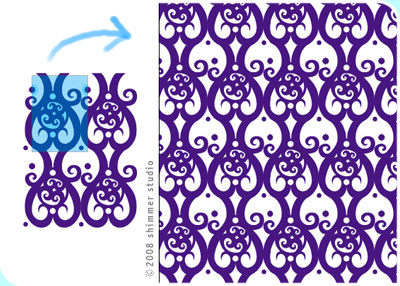
Below is the example I created. The blue square over the design on the left is where my invisible box is and everything outside the box is outside my 4 guides but you group everything and use that entire grouping to define the pattern. I think that invisible box is the glue that holds the whole repeating trick together! On the right is my pattern applied as a fill. Works pretty darn good! I had no idea you could create a repeat pattern with all this overhang and it works perfectly if you keep everything aligned. I love Illustrator even more than I did before!


If you are a Photoshop person there is another way to create repeats using the offset filter which is discussed in this link. I haven't tried this method but it looks like it will work well. You can google "Photoshop offset filter" and find a few thing discussing this method in addition to the link I posted.

Tuesday, August 19, 2008

my process

It's been so long since I last posted... I don't know what happened. I had so many ideas of what my next blog post should be about and then I fizzled out. A long time ago I had decided that I would post about my design process and I even took pictures of my brand new Moleskine sketchbook (below).

I was finally inspired to blog again and post about my process when I came across printmaker and fabric designer Lizzy House's blog about her story and her new line of fabric called Lizzy Dish. I came across her blog because she was featured on the wonderful print & pattern blog.

So without further ado... my process (with some ramblings in between). I felt it was time for a new design phase and nothing kicks things off like a brand new sketch book. My favorites are the Moleskine sketchbooks. They are a good size and I can fit them in many of my handbags (I usually don't purchase a new purse unless it passes the sketchbook test). I'm not exclusive to the moleskines but they house a majority of my illustrations. Sometimes when I am having trouble finishing off a design just right I will pull out tracing paper or marker paper and start tracing my designs so I can draw new version a little faster.


Another handy dandy thing I cannot leave home without is my circle template. I really like the template that is in the photo above because I can make really big circles with it!!! People think I have magical circle drawing powers but I don't — it's the circle template, baby! I think I have about 5 of them now but one or two are always lost. It's a rotating schedule of unfindable items.

Below is the first illustration in my new sketchbook. This design will probably not become anything but I like the clouds and the flowers streaking out of the clouds design I came up with so that has the possibility of becoming a part of another design.


When I sketch I just like to let ideas flow. Sometimes I have very specific things I am trying to reinterpret but a majority of the time I just draw. This method also means that I really need to draw A LOT because out of 5-10 illustrations I may only have one that I want to develop further or it takes me 10 tries to get the illustration where I want it.

After I have an illustration that I know I want to take to the final design phase I scan my hand drawn illustration into the computer and then I use Adobe Illustrator to redraw it. At the computer stage I am sometimes struck with new inspiration and my design may change slightly or not at all. The best way to redraw in Illustrator is to use a Wacom tablet. Instead of a mouse you use a pen-like tool to control the cursor on screen and it is easier to draw with than a mouse. It is also a great way to avoid carpel tunnel syndrome. The mouse kills my wrist if there is a lot of clicking and cursor-action involved and since I am a designer that's pretty much all I do (especially when I use Photoshop and Illustrator). Below are a couple examples of the hand-drawn illustration (on the left) and the final versions in Illustrator (on the right)


Here's the big question — Why do I redraw things in Illustrator? Couldn't I just scan my original illustrations and use those? The answer to the second question is yes I could do pretty much all my letterpress with just hand drawn images scanned into the computer and outputted properly. The reason I redraw everything in Illustrator is so I will always have my illustrations in a very high quality digital format that I can resize and edit easily. I can also then take multiple illustrations and create new composites and repeating patterns. Sometimes it is also easier to print an old design and trace new concepts over it then look for that original sketchbook. Those randomly get lost as well — they are usually having parties with the lost circle templates. Most designs aren't perfected until the computer phase anyway. It is also a completely perfectionist and time-consuming thing to do and I am very persnickety about design things.

Well there you have it... The ramblings of me! Did it make anything clearer or are you more confused? Next time. Repeating patterns. I have some great links to help clear up this little head scratcher.